Nexus and Pre-Nexus Control Panels
Overview
The Nexus control panel was introduced on air-cooled home standby generators manufactured in 2010–2013. Generator controllers used on home standby systems manufactured before 2010 are referred to as “pre-Nexus” controllers.
Nexus Control Panel
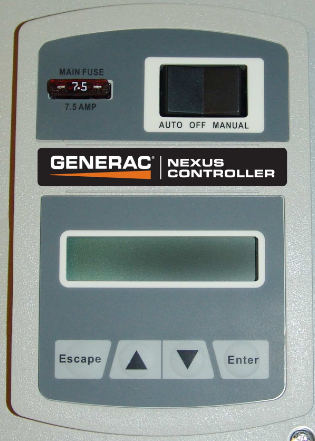
- Compatible with all connectivity device options
- Functional in all Mobile Link applications
- Limited command options
- Sends status only
- Exercise schedule setting available on most models
- Accessories require a battery harness
Auto, Manual, and Off Modes
- Auto – Automatically starts and provides power to the home with a loss of utility. See How Do I Put My Home Standby Generator Into Auto Mode? for more information.
- Manual – Forces the engine to start, but will not provide electricity to the home unless the power fails.
- Off – The unit is off and will not start with loss of utility.
LCD Screen
The LCD provides information about the generator’s status and condition.
- Alarms – Stop the engine and prevent it from starting unless cleared by the user.
- Error codes – Numerical value identifying the alarm/warning.
- Warnings – Identify maintenance requirements or potential problems. Warnings will not prevent the unit from running.
Other Features
Pre-Nexus Control Panel
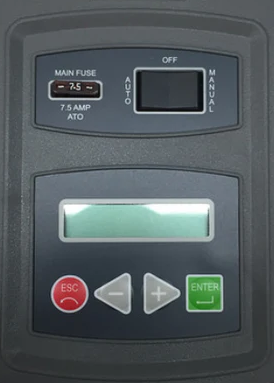
The pre-Nexus control panel was used on air-cooled home standby generators manufactured before 2010.
- Compatible only with the Mobile Link 4G LTE cellular accessory
- Functional only in the Mobile Link Consumer App
- No command options
- Exercise schedule setting available on limited models
Auto, Manual, and Off Modes
- Auto – Automatically starts and provides power to the home with a loss of utility. See How Do I Put My Home Standby Generator Into Auto Mode? for more information.
- Manual – Forces the engine to start, but will not provide electricity to the home unless the power fails.
- Off – The unit is off and will not start with loss of utility.
LCD Screen
The LCD provides information about the generator’s status and condition.
- Alarms – Stop the engine and prevent it from starting unless cleared by the user.
- Error codes – Numerical value identifying the alarm/warning.
- Warnings – Identify maintenance requirements or potential problems. Warnings will not prevent the unit from running.
Other Features
- 7.5A automotive-style fuse – Protects cranking and running circuits. The engine will not start if this fuse is blown or missing.
See also